
Database Grid & Schema Reference
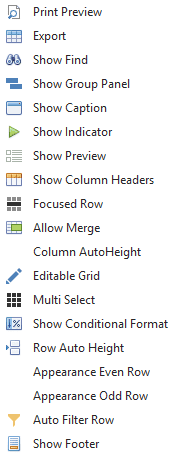
Explanation
| Option - Action | Meaning |
Show Find | The grid can display a find panel that enables users to search for keywords in visible columns. |
| Show Caption | display header |
| Show Group Panel | Sets a value indicating whether the group panel is visible. |
| Show Indicator | Sets a value that indicates whether the driving indicator panel is displayed. |
| Show Preview | Sets a value that indicates whether preview sections are displayed. |
| Allow Cell Merge | Sets whether to merge adjacent cells with identical values. |
| Show Auto Filter | Sets whether to display the autofilter row. |
| Row Auto Height | Sets whether the data grid automatically adjusts the height of data rows depending on the cell contents. |
| Editable Grid | Is the grid / table editable. |
| Column Auto Height | Sets whether the height of the column header panel is automatically adjusted according to the packed column captions. |
| Enable Appearance Even Row Enable Appearance Odd Row | Sets whether the on or even rows are painted using the display settings |
| Show Footer | Sets a value that indicates whether the display footer is displayed. |
| AlwaysVisible | True |
| Show Column Headers | Sets whether column headers are visible. |
| Appearance Focused Row | Sets whether the display settings for a focused row are enabled. |
| Show Conditional Format | Sets whether the Conditional Formatting menu is available at runtime in a column's context menu to allow end users to apply style formatting to columns. |
| Multi Select | Sets whether multiple rows can be selected |
Grid contains Database Description

Column in grid: Schema
In an SQL database, a schema is a list of logical structures of data. A database user owns the schema, which has the same name as the database manager.
Column in grid: Table
Tables are database objects that contain all the data in a database. Tables organize data logically in a row-and-column format, similar to a spreadsheet. Each row represents a unique record and each column represents a field in the record. For example, a table that contains employee information for a company might have a row for each employee and columns that represent employee information, such as employee number, name, address, job title, and home phone number.
Column in grid: Fields
Displays how many fields are defined in the table. For example table Address contains 9 fields:
Column in grid: Records
The number of records in the table.
Column in grid: Created
The date when the table was created.
Column in grid: Modified
The date when the table was modified.
Column in grid: Primary Key
The Primary key constraint uniquely identifies each record in a table. Primary keys must contain UNIQUE values and cannot contain NULL values. A table can have only ONE primary key; and in the table, this primary key can consist of single or multiple columns (fields).
Column in grid: PrimaryKeyName
Name of the Primary Key
Column in grid: ForeignKey
A Foreign Key is a field (or collection of fields) in a table that references the Primary Key in another table. The table with the foreign key is called the child table, and the table with the primary key is called the referenced table or the parent table. Thus, it is a column or combination of columns that is used to create and enforce a link between the data in two tables to control the data that can be stored in the foreign key table.
Column in grid: ForeignKeyName
Name of the Foreign Key
Column in grid: ReferenceTable
You use column-ref to refer to a column (database field), possibly qualified by a table and/or schema name. The column reference includes the data type of the database field that the column represents.
Column in grid: ReferenceColumn
Column in grid: UpdateCascade
Column in grid: DeleteCascade
Number of fields form
The window provides an overview of all fields used in the chosen table.
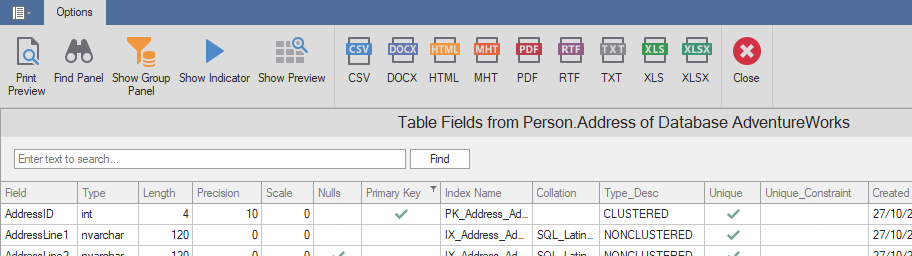
Toolbar
| Option - Action | Meaning |
 | Print preview of the content from the grd. |
 | The grid can display a find panel that enables users to search for keywords in visible columns. |
 | display header |
 | Sets a value indicating whether the group panel is visible. |
 | Sets a value that indicates whether the driving indicator panel is displayed. |
 | Sets a value that indicates whether preview sections are displayed. |
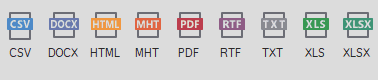 | You can export the grid to various formats: PDF, XLS, XLSX, RTF, CSV, DOCX, TXT, HTML, MHT |
 | Closing the window. |
Overview and list columns
The grid provides an overview of all fields used in the selected table.
Column in grid: Type
The type of the field: String Types: char, varchar, text, nchar, nvarchar, ntext, binary, varbinary, image.
Numeric Types: bit, tinyint, int, smallint, bigint, decimal, numeric, smallmoney, money, float, real
Date and Time Types: datetme, timestamp, date, time, datetimeoffset, smalldatetime
Other Types: sql_variant, xml, uniqueidentifier, cursor, table, ...
Column in grid: Length
The field length specifies the maximum number of characters required to display data in character format. The field length is already known if the data is stored in its original format; for example, the int data type takes 4 bytes.
Column in grid: Scale
Scale is the number of digits to the right of the decimal point in a number. For example, the number 123.45 has an accuracy of 5 and a scale of 2.
Column in grid: Precision
Precision is the number of digits in a number
Column in grid: Nulls
If a field in a table is optional, it is possible to insert a new record or update a record without adding a value to this field. Then the field is saved with a NULL value. Note: A NULL value is different from a zero value or a field that contains spaces.
Column in grid: PrimaryKey
A primary key is a field or set of fields with values that are unique in a table. Values of the key can be used to refer to entire records because each record has a different value for the key.
Column in grid: IndexName
An index contains keys that are from one or more columns in the table of view.
Column in grid: Collation
A collation is a configuration setting that determines how the database engine should treat character data at the server, database, or column level.
Column in grid: Type_Desc
Columns in grid: Unique, Unique_Constraint
The UNIQUE constraint ensures that all values in a column are different. Both the UNIQUE and PRIMARY KEY constraints provide a guarantee of uniqueness for a column or set of columns.
Column in grid: Created
When was the field created.
