
Asset Management – Startup Configuration
The Startup module of Sirkel Tools allows you to configure your data source and customize branding before launching the IT Asset Management dashboard.
This setup ensures your asset data is correctly imported and visually aligned with your organization.
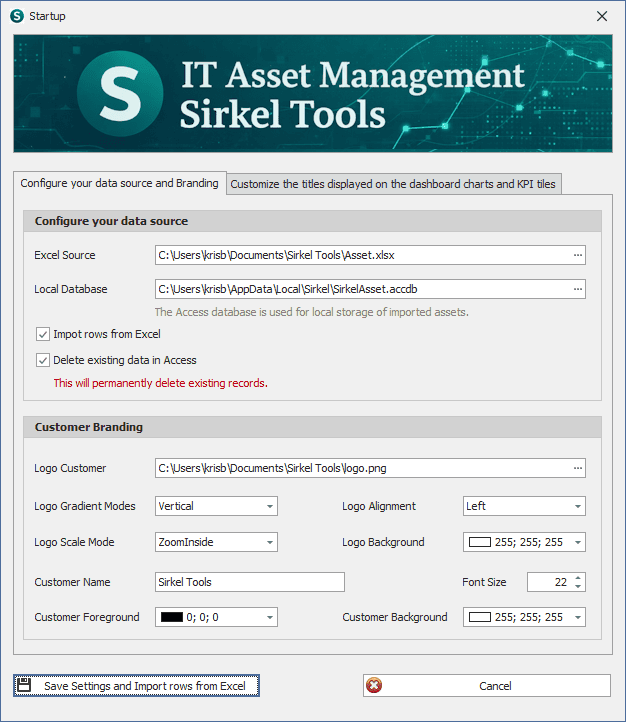
1️⃣ Configure Your Data Source
The first step is connecting your asset inventory source.
Excel Source
Define the location of your master asset file:
C:\Users\...\Sirkel Tools\Asset.xlsx
This Excel file contains your asset inventory data and serves as the primary data source.
Local Database
C:\Users\...\AppData\Local\Sirkel\SirkelAsset.accdb
The Microsoft Access database is used for:
- Local storage of imported assets
- Faster dashboard performance
- Structured data handling
- KPI aggregation
Import Options
✔ Import rows from Excel
Imports all asset records into the local database.
✔ Delete existing data in Access
Removes previously stored records before importing new data.
⚠️ Warning: This action permanently deletes existing records.
Use this option when performing a full refresh of your asset inventory.
2️⃣ Customer Branding Configuration
Sirkel Tools allows white-label customization.
Logo Setup
- Upload your company logo
- Supported formats: PNG (recommended)
- Configure gradient mode (Vertical / Horizontal)
- Select alignment (Left / Center / Right)
Logo Display Options
- Logo Scale Mode: ZoomInside (recommended for proportional fit)
- Logo Background: RGB configuration available
- Customer Name: Display name on dashboard
- Font Size: Adjustable (recommended: 20–24)
Branding Colors
- Customer Foreground
- Customer Background
- Logo Background
These settings ensure dashboard alignment with corporate identity.
3️⃣ Save and Initialize
Click:
Save Settings and Import rows from Excel
This will:
- Store configuration settings
- Import asset data
- Initialize dashboards
- Generate KPI tiles
The system is now ready for use.
🔍 Best Practices
✅ Keep Excel structure consistent
✅ Avoid manual modifications in the Access database
✅ Perform full refresh only when required
✅ Store Excel file in a controlled shared directory
✅ Regularly back up your source file
🏢 Designed for IT Governance & Control
This startup configuration is ideal for:
- IT Asset Managers
- Infrastructure Teams
- IT Governance Leads
- Audit & Compliance Officers
Sirkel Tools ensures traceability, structured reporting, and reliable KPI visualization.
🚀 Next Steps
After configuration:
- Review dashboard KPIs
- Validate asset categories
- Configure reporting exports
- Customize chart titles (via the Branding tab)
Need Support?
For configuration assistance or enterprise deployment, contact the Sirkel Tools support team.
