
Sirkel Spreadsheet – IT Asset Overview
The Sirkel Spreadsheet provides a structured overview of IT assets within your organization.
It centralizes hardware, users, lease data, lifecycle tracking and location details in one clear interface.
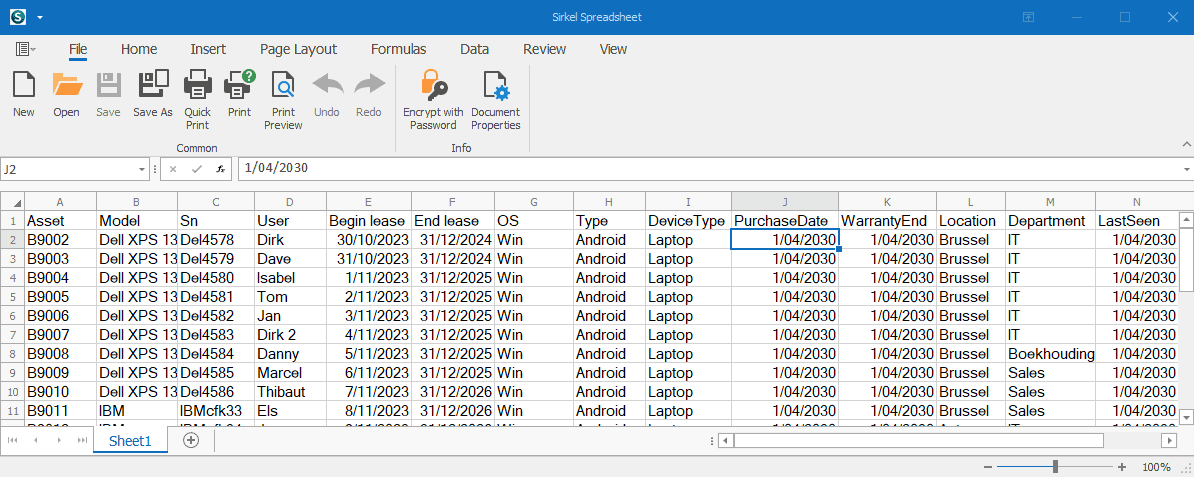
This module is designed to support IT Asset Management processes, reporting and operational control.
Asset Data Structure
Each row represents one IT asset.
The following core fields are available:
Asset Identification
- Asset – Unique asset ID
- Model – Device model
- SN – Serial number
User & Lifecycle
- User – Assigned employee
- Begin Lease – Lease start date
- End Lease – Lease end date
- Purchase Date – Acquisition date
- Warranty End – Warranty expiration
- Last Seen – Last recorded activity
Technical Details
- OS – Operating system
- Type – Device category
- DeviceType – Physical device classification
Organizational Data
- Location – Office or site
- Department – Assigned department
Key Capabilities
The Sirkel Spreadsheet enables:
- Centralized IT asset tracking
- Lease and warranty monitoring
- Lifecycle visibility
- Department and location reporting
- Data consistency for dashboard integration
- Structured export for reporting purposes
Typical Use Cases
- Monitoring upcoming lease expirations
- Identifying warranty end dates
- Tracking device allocation per department
- Preparing IT asset audit reports
- Supporting budgeting and replacement planning
Integration
The spreadsheet structure supports integration with:
- Reporting dashboards
- IT Asset Management workflows
- Export processes for audit and compliance
How It Works
The Sirkel Spreadsheet follows a structured asset lifecycle model.
1. Asset Registration
Each device is registered with a unique Asset ID, serial number, model and technical specifications.
2. User Assignment
Assets are linked to a specific user, department and location to ensure accountability and traceability.
3. Lifecycle Tracking
Purchase date, lease start and lease end dates allow full lifecycle visibility.
Warranty end dates support proactive replacement planning.
4. Monitoring & Updates
The “Last Seen” field enables activity tracking and operational follow‑up.
5. Reporting & Integration
Structured fields allow seamless export and integration with dashboards for advanced reporting and data analysis.
