
SQL Server Search and Replace
Quickly Find and Update Data Across Your Database
Sirkel Search and Replace allows you to efficiently search for specific values across database tables and update them in a controlled and structured way. This tool is ideal for bulk updates, data corrections, and maintaining data consistency in SQL Server environments.
Instead of writing complex SQL queries manually, you can visually search, filter, and replace values across multiple records.
What Does SQL Server Search and Replace Do?
- Logs all updates for traceability
- Searches for values across selected tables
- Displays matching records in a clear grid
- Allows controlled updates of selected rows
- Supports bulk modifications
How It Works
1. Enter Search Value
Provide the value you want to find (e.g. "Sport").
2. Select Tables
Choose one or multiple tables where the search should be executed.
3. Define Search Type
- Text or numeric values
- Flexible matching options
4. Execute Search
Sirkel scans the selected tables and displays matching records instantly.
5. Select Rows to Update
Choose specific rows or apply updates to all results.
6. Set New Value
Define the replacement value.
7. Apply Updates
Execute the update safely with full control.
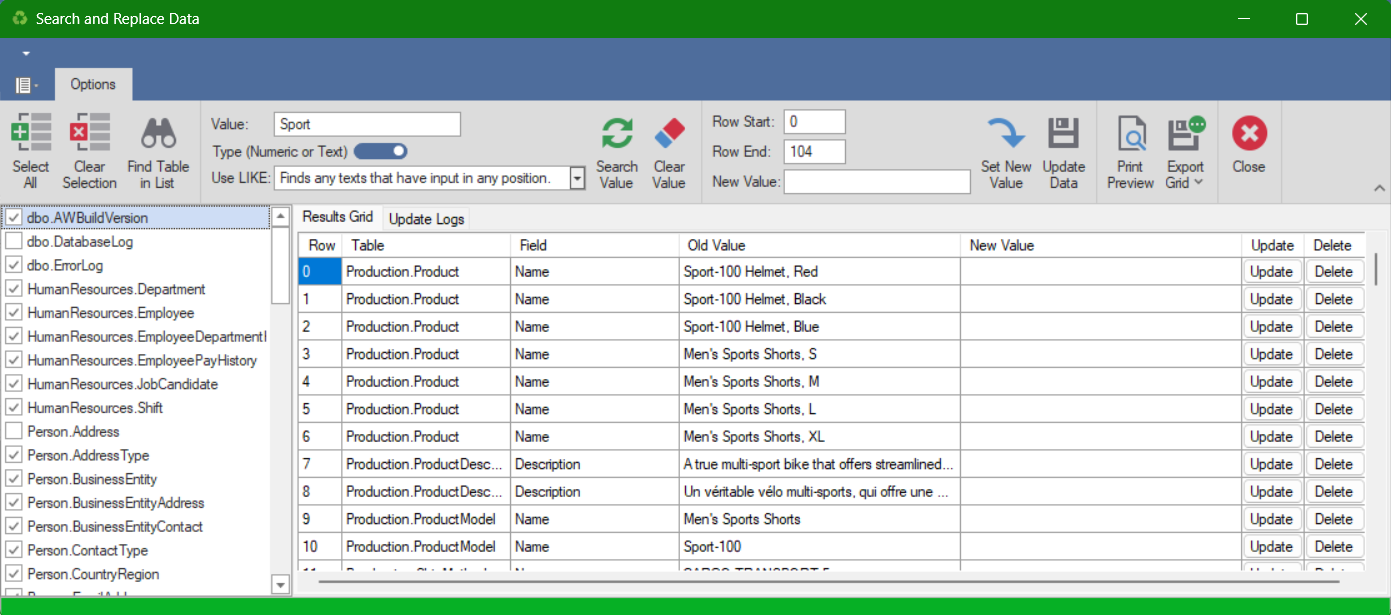
SQL Server Search and Replace: overview and list of the options
| Possibility | Action | Results |
|---|---|---|
 | All possibilities - tick tables in the list. |  |
 | No options - check tables in the list. |  |
 | Find the table in the list. | |
 | Enter the value that will be searched for in the selected table(s). | |
 | Specify the type (numeric or text) to be searched for. | |
 | If text is selected, indicate what kind of LIKE will be used in the SQL. Selections you can make: 1) Find the exact value. 2) Finds any values that start with input. 3) Finds any values that end with input. 4) Finds any values that have input in any position. | |
 | Look up the value entered in the selected table(s). | |
 | Clear the value and selected options. | |
 | Number of rows that have the input value. Afterwards you can adjust the rows for a possible update. In the textbox you can define the new value. | |
 | Fill in the new value in the grid. | |
 | Run the updates. | |
 | Results of the updates. Here you have the option to individually update or delete a selected value. | |
 | If you click on the 'Update Logs' tab, the results after one or more update(s) are displayed in a table. |  |
 | Generate a print preview of the results in the grid. | |
 | You can export the results to various formats: PDF XLS XLSX RTF CSV DOCX TXT HTML MHT | |
 | Closing the window. |
Key Features
- Multi-table search functionality
- Grid-based result overview
- Selective or bulk updates
- Preview before applying changes
- Update logging for auditing
- Simple and fast workflow
Example Use Cases
Data Cleanup
Fix inconsistent values across multiple tables.
Bulk Updates
Update large datasets without writing SQL scripts.
Data Standardization
Ensure consistent naming conventions or formats.
Maintenance Tasks
Quickly correct errors in production or staging environments.
Results and Logging
After executing updates:
- Results are shown in the Results Grid
- All changes are tracked in Update Logs
- You maintain full visibility of what was modified
Why Use SQL Server Search and Replace?
- Eliminates manual SQL scripting
- Reduces risk of errors
- Saves time on repetitive updates
- Provides full control and transparency
- Designed for SQL Server professionals
