
SQL Server Data Search, Export & Documentation Tool
Search, export and document SQL Server data across databases in seconds — all in one powerful tool.
🧠 WHAT PROBLEM DOES THIS SOLVE?
Working with SQL Server data often means:
- Searching across multiple databases manually
- Writing repetitive queries
- Exporting data in multiple steps
- Lack of clear database documentation
👉 This leads to lost time, errors and inefficient workflows
🚀 THE SOLUTION
Sirkel SQL Server Tool simplifies your data workflow
Search, export and document your SQL Server data from one interface — fast, structured and reliable.
⚙️ KEY FEATURES
🔍 Search Across Databases
Quickly search data across multiple SQL Server databases, tables and views.
📤 Export Data Instantly
Export results to Excel or CSV with one click.
📄 Generate Documentation
Automatically create structured documentation of your database objects.
⚡ Fast & Efficient Queries
Execute queries quickly with optimized performance.
🔗 Multi-Database Support
Connect to multiple databases and work across environments seamlessly.
🖥️ SEE THE TOOL IN ACTION
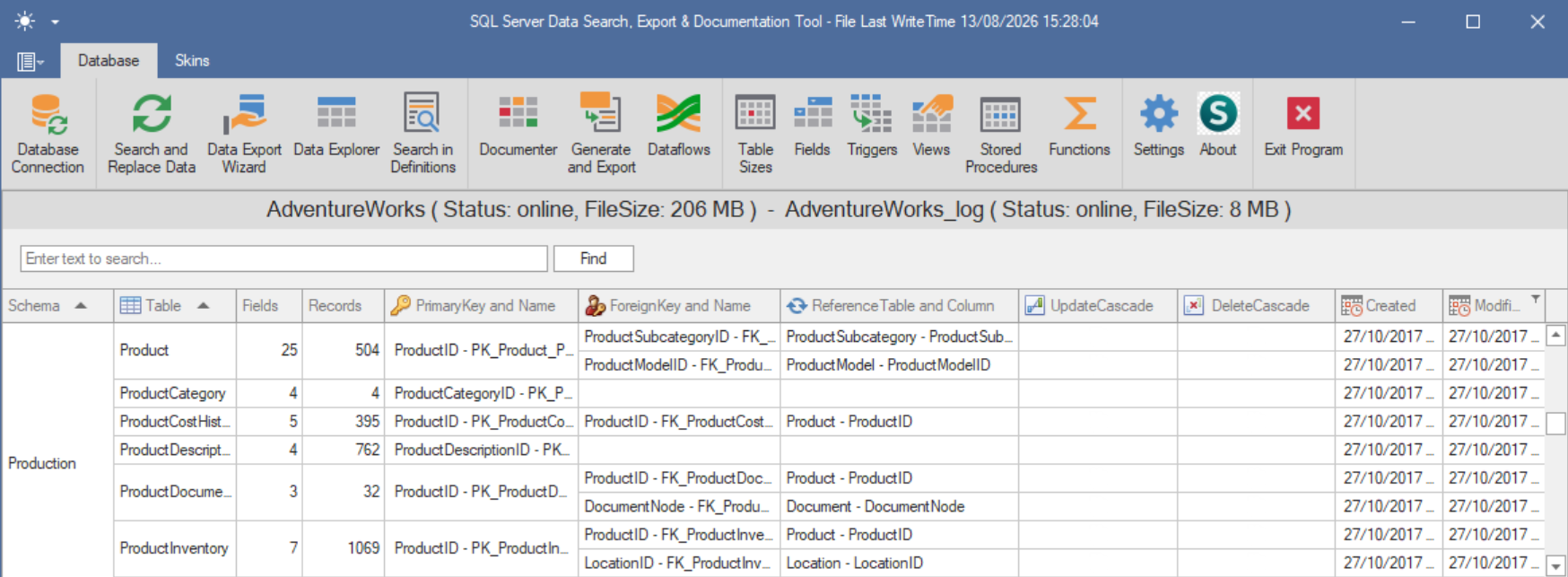
🔧 HOW IT WORKS
- Connect to your SQL Server database
- Select tables, views or queries
- Search or filter your data
- Export results or generate documentation
👥 WHO IS THIS TOOL FOR?
- Data Analysts
- SQL Developers
- IT Teams
- Reporting Specialists
🧩 SUPPORTED FEATURES
- Tables, Views
- Stored Procedures
- Custom SQL Queries
- Data Export (Excel, CSV)
- Documentation generation
💡 WHY SIRKEL?
- All-in-one SQL productivity tool
- Saves time on repetitive tasks
- Improves data visibility
- Simplifies documentation
Number of fields form
The window provides an overview of all fields used in the chosen table.
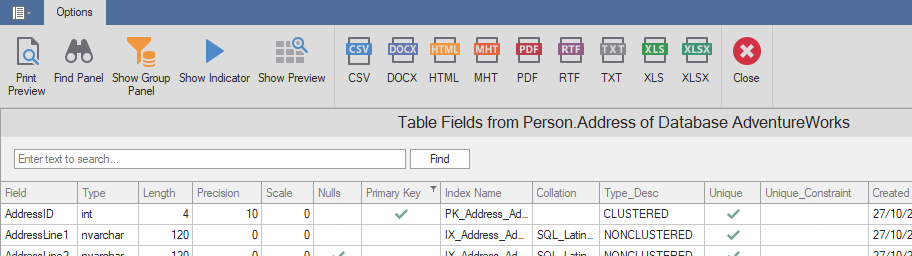
Toolbar
| Option - Action | Meaning |
 | Print preview of the content from the grd. |
 | The grid can display a find panel that enables users to search for keywords in visible columns. |
 | display header |
 | Sets a value indicating whether the group panel is visible. |
 | Sets a value that indicates whether the driving indicator panel is displayed. |
 | Sets a value that indicates whether preview sections are displayed. |
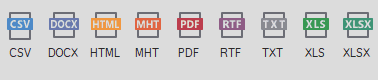 | You can export the grid to various formats: PDF, XLS, XLSX, RTF, CSV, DOCX, TXT, HTML, MHT |
 | Closing the window. |
Overview and list columns
The grid provides an overview of all fields used in the selected table.
Column in grid: Type
The type of the field: String Types: char, varchar, text, nchar, nvarchar, ntext, binary, varbinary, image.
Numeric Types: bit, tinyint, int, smallint, bigint, decimal, numeric, smallmoney, money, float, real
Date and Time Types: datetme, timestamp, date, time, datetimeoffset, smalldatetime
Other Types: sql_variant, xml, uniqueidentifier, cursor, table, ...
Column in grid: Length
The field length specifies the maximum number of characters required to display data in character format. The field length is already known if the data is stored in its original format; for example, the int data type takes 4 bytes.
Column in grid: Scale
Scale is the number of digits to the right of the decimal point in a number. For example, the number 123.45 has an accuracy of 5 and a scale of 2.
Column in grid: Precision
Precision is the number of digits in a number
Column in grid: Nulls
If a field in a table is optional, it is possible to insert a new record or update a record without adding a value to this field. Then the field is saved with a NULL value. Note: A NULL value is different from a zero value or a field that contains spaces.
Column in grid: PrimaryKey
A primary key is a field or set of fields with values that are unique in a table. Values of the key can be used to refer to entire records because each record has a different value for the key.
Column in grid: IndexName
An index contains keys that are from one or more columns in the table of view.
Column in grid: Collation
A collation is a configuration setting that determines how the database engine should treat character data at the server, database, or column level.
Column in grid: Type_Desc
Columns in grid: Unique, Unique_Constraint
The UNIQUE constraint ensures that all values in a column are different. Both the UNIQUE and PRIMARY KEY constraints provide a guarantee of uniqueness for a column or set of columns.
Column in grid: Created
When was the field created.
